
Prepared in cooperation with Michael Bonner (U of Michigan)
In 1997, Cultural Foundation in Abu Dhabi (http://www.adach.ae) started development of an extremely useful multimedia Encyclopaedia of [Arabic] Poetry (al-Mawsūʿa al-Shiʿriyya). The first edition (published in 1998) was pretty small and included only about 180,000 bayts by 88 poets together with the electronic version of Ibn Manẓūr’s Lisān al-ʿArab. The second edition (published in 2001) was much more impressive, containing more than 1,800,000 bayts by more than 1,000 poets as well as 46 additional sources of reference character.
The third edition, which will be reviewed in details in what follows, significantly surpassed earlier versions: it contains 2,439,589 bayts by 2,300 poets, and is supplemented with 265 books on different aspects Arabic language and literature (al-lugha wa-l-adab) and 10 major Arabic dictionaries. Chronologically, it includes every piece of Arabic poetry from pre-Islamic era until nowadays (kullu ma qīla min al-shiʿr al-ʿarabī mundhu mā qabla l-islām wa-ḥattā l-ʿaṣr al-ḥadīth) — everything for poets who died before 1953, and after that date — only dīwāns of most important poets (ahammu l-shuʿarāʾ). The entire program fits into only 1 CD.
As to the quality of electronic texts, all poems seem to have been meticulously reproduced: unlike in many other available databases, here the original formatting of poetry is preserved — all bayts are split in two hemistiches, traditionally aligned and fully vocalized. However, there are no indications in the database to published sources, from which the poems were taken. On the other hand, our not numerous but pretty random attempts to compare digital texts on the database with respective paper editions tend to convince us that the quality of digital reproduction of texts in this database is on very high level. Other 275 books — although similarly well reproduced — also have no links to their respective paper editions.
In addition to the great number of poetical and prose texts, the program is fully packed with most useful research and reference tools, like a search engine with a lot of capabilities, metre analyzer, and audio recordings of selected poems, performed by outstanding poetry reciters (nukhba min al-asātidha wa-l-fannānīn). What the developers should also be praised for is comprehensive tables of statistical data on poets, poems, metres, verses and so on.
Bearing in mind great number of texts and research tools as well as high quality of reproduction, this database is an extremely valuable tool for any student of Arabic poetry, literature and language.
System requirements and program installation
The Encyclopaedia was tested on Windows XP. It is quite well-designed and stable, but not without some issues. Actually, the only major problem was installation: it is necessary to change localization settings, otherwise Arabic will appear unreadable and the program will keep crashing.
Windows XP. To change settings in XP: Go to “Start” → “Control Panel” → “Regional and Language Options” → [1] on the first Tab “Regional Options” choose Arabic (any country) in the “Standards and formats” section. [2] Then choose Tab “Advanced” and, in section “Language for non-Unicode programs”, choose Arabic (any country). [3] If Arabic is not available, go back to Tab “Languages” and in section “Supplemental language support” check “Install files for complex scripts and right-to-left languages”. Then choose Arabic as described above. You will need to reboot the computer.
NB: When you change language for non-Unicode programs, some symbols in some other non-Unicode programs (e.g. in German, French, Russian etc.) will appear unreadable. To use those programs you will need to change “Language for non-Unicode programs” back to the original language.
There are four different options of how much data will be copied to the hard drive, but even with the biggest available installation you will have to keep a CD in drive. This, however, can be overcome by making an image of the CD you own and running it in the virtual CD/DVD-Rom drive (e.g. using “Daemon Tools”, a free utility).
Not really a problem, but more of inconvenience is that the program is designed to work only in 800 x 600 resolution, which may turn out to be inconvenient when used on monitors of high resolution, since everything will appear too small.
The language of interface of the Encyclopaedia is Arabic only.
User’s interface and basic capabilities
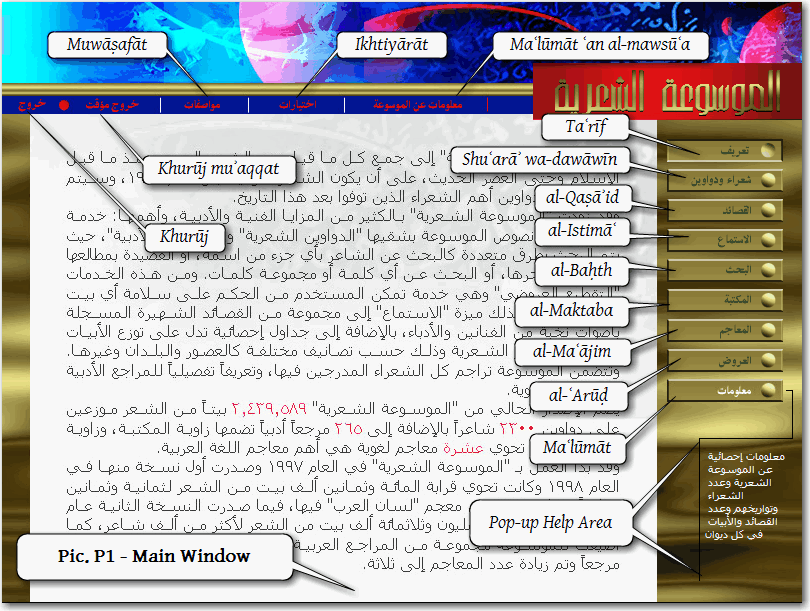
Opening the Encyclopaedia takes user to the Main Window (see below), with two menus available. The vertical menu is the main menu, which provides access to the main features of the database; the horizontal one is the auxiliary menu, which provides access to different settings and technical functions.
Main menu (each major window, which can be accessed from the Main Menu will be reviewed below in full details):
[Pic. P1]
- Taʿrīf opens a window with a short introductory passage about the al-Mawsūʿa l-Shiʿriyya project, its history and some major details on the current edition.
- Shuʿarāʾ wa-dawānīn opens a list of poets, included into the database, with very short biographical entries. Each poet’s page also shows the number of poems and poetic lines and provides access to them. This page has convenient chronological and geographical filter options.
- al-Qaṣāʾid displays the last open poem, which can be copied, printed and thoroughly studied with the set of built-in tools. The al-Qaṣāʾid button is unavailable until any poem is open.
- al-Istimāʿ opens the section with audio recordings of selected poems, performed by outstanding poetry reciters (nukhba min al-asātidha wa-l-fannānīn).
- al-Baḥth opens search window, where one can search texts of the database for a specific word or phrase; search range can be specified in several different ways.
- al-Maktaba opens a section of the database with most important Arabic sources on manifestations of language and literature (majālī l-lugha wa-l-adab); each source has an annotation and biographical details on its author.
- al-Maʿājim opens a section of the database with the most important dictionaries of the Arabic language, each of which can be searched either for a particular word or a root.
- al-ʿArūḍ opens a section with (1) basic information on the Science of Metre (ʿilm al-ʿarūḍ), including mnemonics for 16 metres (pl. buḥūr); (2) metre analyzer; and (3) comprehensive statistics on metres in the history of Arabic poetry.
- Maʿlūmāt opens a window with the detailed information on the contents of the database.
- Pop-up Help Area. Whenever the cursor hovers over any field or button a short annotation pops up in this area. On the picture, the cursor is hovering over Maʿlūmat button (the cursor is invisible, but the name of the button differs in color from other buttons) and there is a short annotation in the Help Area.
Auxiliary menu:
- Maʿlūmāt ʿan al-Mawsūʿa pops up credits window with the names of scholars, who contributed to this project; and contact information (outdated).
- Ikhtiyārāt opens user’s bookmarks window.
- Muwāṣafāt opens display and printer settings.
- Khurūj muʾaqqat minimizes the program.
- Khurūj exits the program.
Shuʿarāʾ wa-dawāwīn window
Clicking Shuʿarāʾ wa-dawāwīn button opens a window where one can select or search for a certain poet, using a wide variety of options. Overall, system of navigation within poets and their poems is very convenient and easy to use.
[Pic. P2]
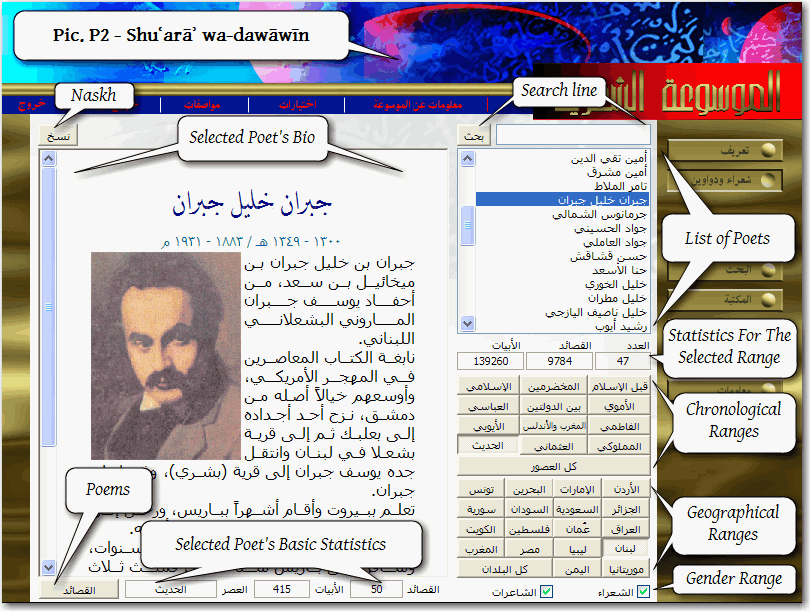
- List of Poets displays names of poets, whose poems are available in the database. The list can be scrolled to a searched-for poet, or searched using the Search Line. The List of Poets can be filtered using available Ranges buttons:
- Chronological Ranges buttons filter poets by epochs. For example, Qabla l-Islām button displays only pre-Islamic poets; al-Mukhadramīn displays those, who lived in the Jāhiliyya and in the time of Islām; al-Islāmī display those, who lived in the time of Islām; al-Umawī displays those, who lived during the Umayyad Caliphate, al-ʿUthmānī displays poets of the Ottoman Empire, al-Ḥadīth — modern poets and so on; Kullu l-ʿuṣūr displays poets from all periods of Islamic history. (al-ʿUthmānī and al-Ḥadīth can be combined with Geographical Ranges)
- Geographical Ranges filters poets by regions, e.g., al-Urdunn displays Jordanian poets, Miṣr — Egyptian ones and so on; Kullu l-buldān displays poets from all arabophone regions of the Islamdom.
- Gender Range filters poets by gender and allows displaying either poets, or poetesses or both.
- Statistics For The Selected Range displays the number poets (al-ʿadad), poems (al-qaṣāʾid) and verses (al-abyāt).
- Selected Poet’s Bio: when a certain poet[ess] is selected, his/her short biographical entry is displayed on the left: full name, dates of life, a picture (if exists).
- Selected Poet’s Basic Statistics is displayed below the biographical entry. It shows the number of poems and verses included into the database and the epoch, to which the person belongs.
- Poems button (al-Qaṣāʾid) opens a list of the selected poet’s poems.
On Pic. P2-1 poets are filtered with al-Ḥadīth and Lubnān options (Modern [Poets] and Lebanon respectively). Statistics For The Selected Range shows that there are 47 poets (46 poets and 1 poetess), 9,784 poems and 139,260 verses found for this search range. Jibrān Khalīl Jibrān (1300-1349 A.H./1883-1931 A.D.) is selected in the filtered list of poets and his biographical entry is displayed on the left; below, Selected Poet’s Basic Statistics shows that there are 50 poems and 415 verses available, and that he belongs to the modern time.
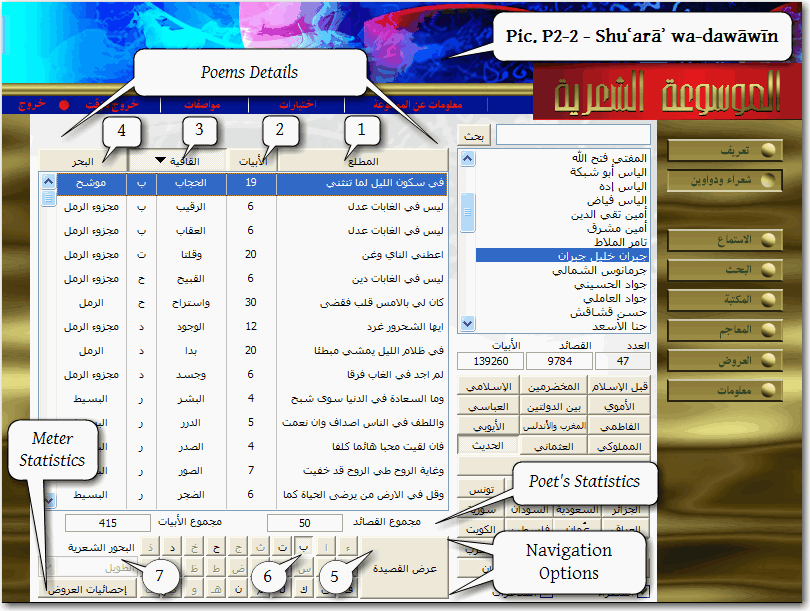
Clicking Poems button (al-Qaṣāʾid) takes user to the list of Jibrān Khalīl Jibrān’s poems (see Pic. P2-2). The right part remains the same as in the previous window, but the left one — in which poet’s biography was displayed — changes into Poem Details table with the following columns.
(1) al-Maṭlaʿ — opening verses of poems.
(2) al-Abyāt — the number of verses in each poem.
(3) al-Qāfiya — the rhythm of each poem.
(4) al-Baḥr — the metre of each poem.
[Pic. P2-2]
Data in this table can be sorted (descending) by each of these four columns. Sorting affects the availability of Navigation Options, which are as follows:
(5) ʿArḍ al-qaṣīda opens the selected poem (see al-Qaṣāʾid section).
(6) Alphabetic buttons take to the first item in the Poems Details table, which starts with the selected letter; it applies only to a field, by which the table is sorted, i.e. if it is sorted by rhythms, clicking Bāʾ button will highlight the first item within Bāʾ-rhythmed poems.
(7) al-Buḥūr al-Shiʿriyya is available only when the table is sorted by metres; selecting a certain metre will highlight the first poem within this metre range.
Metre Statistics button (Iḥṣāʾiyyāt al-ʿarūḍ) opens a chart, which displays what metres were used by a selected poet[ess] and how many poems and verses s/he composed in this metre. Thus, preferred metres of Jibrān Khalīl Jibrān were raml (23 poems and 224 verses) and basīṭ (18 and 81 respectively).
Al-Qaṣāʾid window
Clicking al-Qaṣāʾid button opens the last viewed poem. The top of the screen provides basic information about the poem: Name of a Poet (Zuhayr b. Abī Sulmā), Metre of a Poem (ṭawīl), and Number of Verses in a Poem (59 verses). The poem itself follows below: each verse is numbered and the Current Verse is highlighted with a different color. On the left side of the screen one can find Navigation pane, which allows browsing the open poem by verse and/or page, as well as getting to its beginning or/and end.
On the bottom of the screen one can find a toolbar:
- Commentary on The Verse button (Sharḥ) opens Sharḥ al-bayt window with detailed commentary on the Current Verse. This function is available only to major poems.
- Bookmark button (ʿAlāma) bookmarks the Current Verse. Bookmarks can be accessed from Ikhtiyārāt window (see below).
- Comment button (Taʿqīb) opens a pop-up window, into which any notes can be typed. Comments can be accessed from Ikhtiyārāt window (see below).
- Print button (Ṭibāʿa) sends the current page to a printer. Printer can be selected/changed in Muwāṣafāt window (see below). Depending on what soft- and hardware is installed on the host computer, the current page of the poem can be printed out or saved into available file formats (like PDF).
- Copy button (Naskh) copies the Current Verse into computer’s memory. After that, the verse can be pasted into any text file.
- Dictionaries button (al-Mujam) changes mouse cursor into question mark. After that, clicking on any word in a poem will open Dictionaries section (al-Maʿajim) of the database (for full details, see relevant section below), where the meaning and examples of usage of the word in question can be checked in any of ten available dictionaries. Click al-Qaṣāʾid button in the main menu to return to the poem.
[Pic. P3]
al-Istimāʿ window
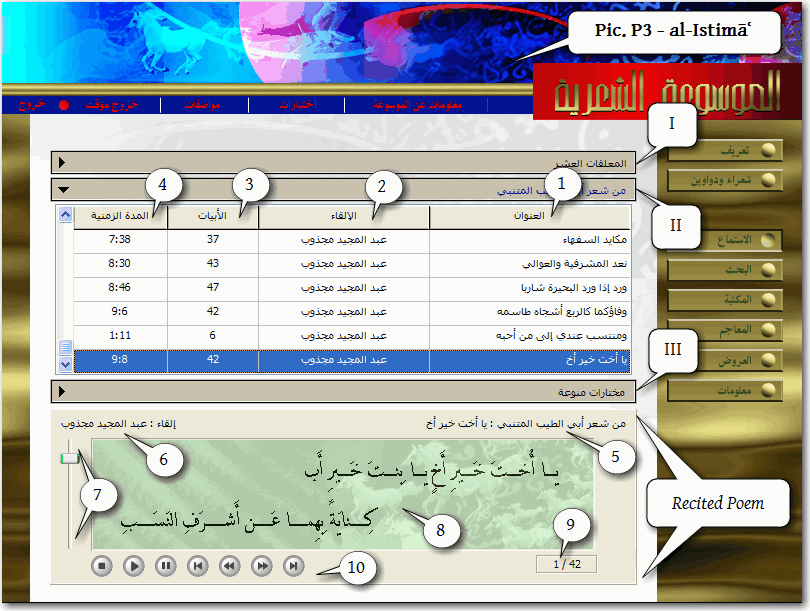
Clicking al-Istimāʿ button opens audio samples section of the database, which consists of three major sections: [I] al-Muʿallaqāt al-ʿashar — 10 classical masterpiece qaṣīdas; [II] Min shiʿr Abī Ṭayyib al-Mutanabbī — a selection of 48 poems of al-Mutanabbī; and [III] Mukhtarāt munawwaʿa — six poems by Ibn Zurayq al-Baghdādī, Abū Nuwās, al-imām al-Shāfiʿī, al-Ḥallāj and al-Maʿarrī.
Materials of each section are arranged in tables: (1) al-ʿUnwān — titles of poems; (2) al-Ilqāʾ — names of reciters; (3) al-Abyāt — the number of verses; and (4) al-Mudda l-zamaniyya — Duration of the recording.
After a poem is selected, recitation starts automatically and the text of the poem is displayed in the Recited Poem section of the window, with the following information: (5) poet’s name; (6) reciter’s name; (7) volume control; (8) text of the recited verse; (9) ordinal number of the recited verse; (10) playback buttons. Poems are displayed verse by verse and synchronized with recitation; one can pause/stop recitation at any moment and move forward of backwards with (10) playback buttons.
al-Baḥth window
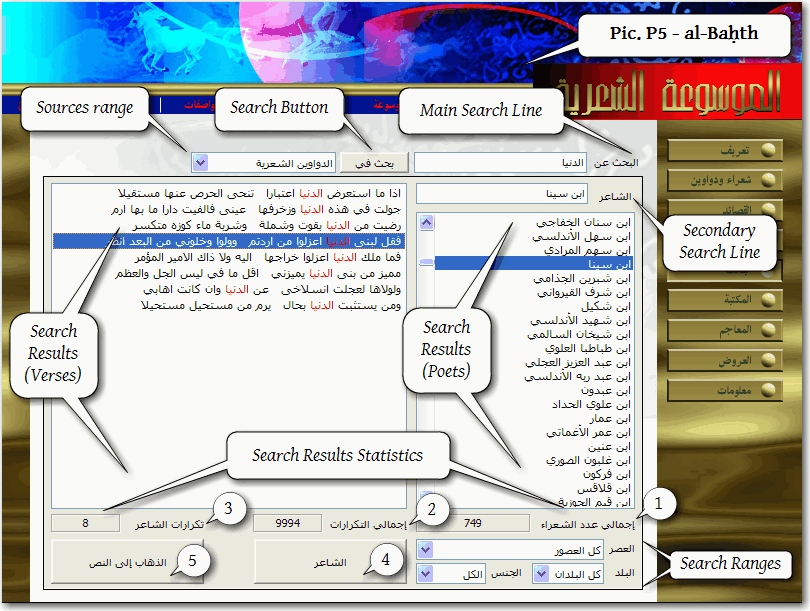
Clicking al-Baḥth button opens search window, where one can search the entire database for a particular word or words, which should be entered into Main Search Line (al-Baḥth ʿan...).
[Pic. P5]
Search Ranges. Search can be conducted either in poems (al-dawāwīn al-shiʿriyya) or in the auxiliary library of 265 sources on language and literature (al-Maktaba). Search Ranges can also be narrowed down by specifying epoch, region and gender.
Search Results are displayed in two columns — Poets on the right and Verses on the left. The Secondary Search Line can be used to find a particular poet[ess] in Search results, if their number is too big. When any poet is selected in Search Results, verses from his poems, which contain the searched-for word(s), are displayed in the left column. The searched-for words are red.
Search Results Statistics is displayed under the two columns of Search Results: (1) Total number of poets/poetesses; (2) Total number of words found; (3) Total number of words found in poems of a selected poet[ess].
Findings can be viewed either by clicking (4) al-Shāʿir button in order to view biographical sketch about a selected poet[ess], or (5) al-Dhahāb ilā l-qaṣīda button in order to view a selected poem (see al-Qaṣāid section).
On Pic. P5 you can see that we searched for the word al-dunyā in Poems. Since it is one of the most common words, we used Secondary Search Line to find a particular poet — Ibn Sīnā. Search Results Statistics display that the total number of poets, who used this word is 749; the total number of repetitions of this word is 9,994; and that in Ibn Sīnā’s poems it is found 8 times.
al-Maktaba window
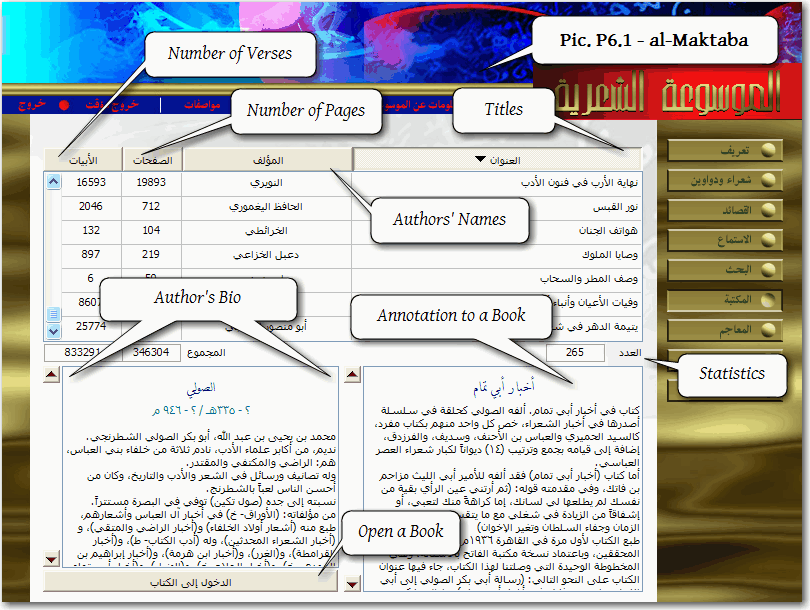
Clicking al-Maktaba button opens library section of the database, which consists of 265 books on different aspects Arabic language and literature (al-lugha wa-l-adab).
[Pic. P6.1]
All books are presented in a table with following columns: Titles displays titles of books; Author’s Names — their respective authors; Number of Pages displays number of digital pages for each book; Number of Verses — number of lines of poetry, contained in a book. Below the table there is a Statistics line, which displays total numbers of books (265), pages (346,304) and verses (833,291). For the full list of sources, included in the database, see URL… The lower part of the screen contains a short biographical sketch for the author of a selected book (Author’s Bio) and a short annotation to a selected book (Annotation to a Book). Open a Book button takes user to a selected book (see Pic P6.2).
[Pic. P6.2]
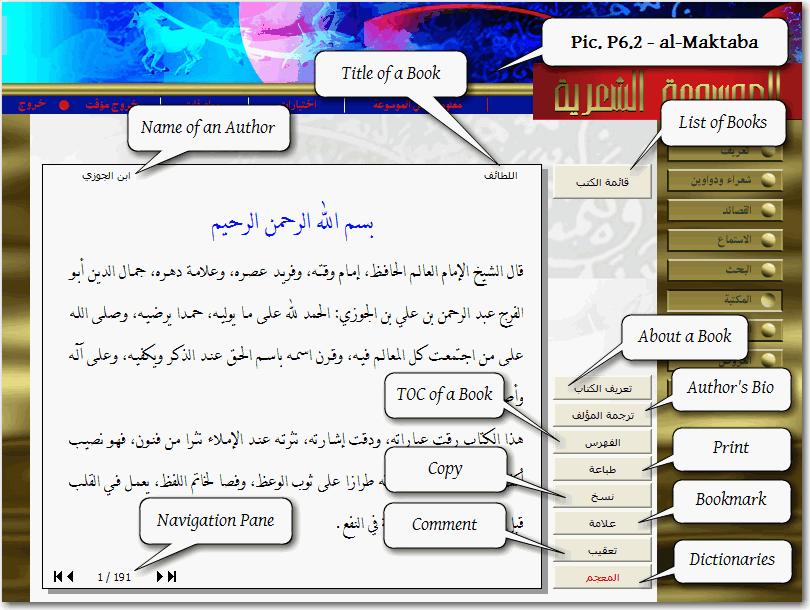
On this screen, similar to reading mode in al-Turāth databases, user can work with books. On the top of the screen there are the Title of a Book (Here it is al-Laṭāʾif) and the Name of an Author (Here — Ibn al-Jawzī). On the right, one can find a column of buttons:
- the List of Books (Qāʾimat al-kutub) button will take user back to the previous screen with the entire list of sources;
- About a Book (Taʿrīf al-kitāb) and Author’s Bio (Tarjamat al-muʾallif) will display an annotation to a book and its author’s biographical sketch respectively (second click will take user back to a book);
- TOC of a Book (al-Fihrist) opens Table of Contents for an open book, with which user can navigate within a book. A book can also be browsed page by page using Navigation Pane in the bottom left corner of the screen.
- Print button (Ṭibāʿa) sends the current page to a printer. Printer can be selected/changed in Muwāṣafāt window (see below). Depending on what soft- and hardware is installed on the host computer, the current page of the poem can be printed out or saved into available file formats (like PDF).
- Copy button (Naskh) copies the current page into computer’s memory. After that, the verse can be pasted into any text file.
- Bookmark button (ʿAlāma) bookmarks the Current Verse. Bookmarks can be accessed from Ikhtiyārāt window (see below).
- Comment button (Taʿqīb) opens a pop-up window, into which any notes can be typed. Comments can be accessed from Ikhtiyārāt window (see below).
- Dictionaries button (al-Muʿjam) changes mouse cursor into question mark. After that, clicking on any word in a poem will open Dictionaries section (al-Maʿajim) of the database (for full details, see relevant section below), where the meaning and examples of usage of the word in question can be checked in any of ten available dictionaries. Click al-Maktaba button to continue reading the book.
al-Maʿājim window
Al-Maʿājim section contains 10 major dictionaries of the Arabic language. There are two ways to get to this section of the database. One is to click al-Maʿājim button on the very right pane of buttons: this will take user to a screen very similar to that of al-Maktaba, where one can read annotations to every dictionary and biographical sketches on their compilers. The second way is to use Dictionaries button (al-Muʿjam), while in al-Qaṣāʾid or al-Maktaba sections. The second way takes user directly to entries on a searched-for word.
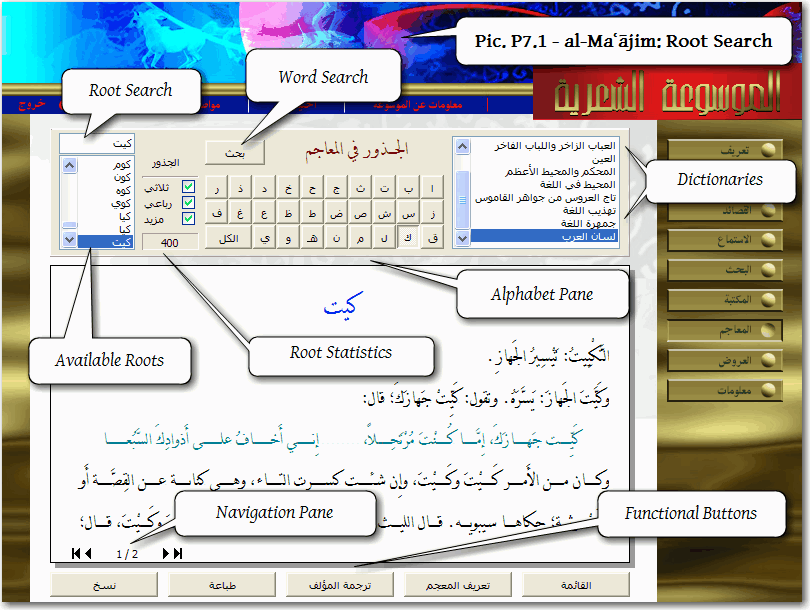
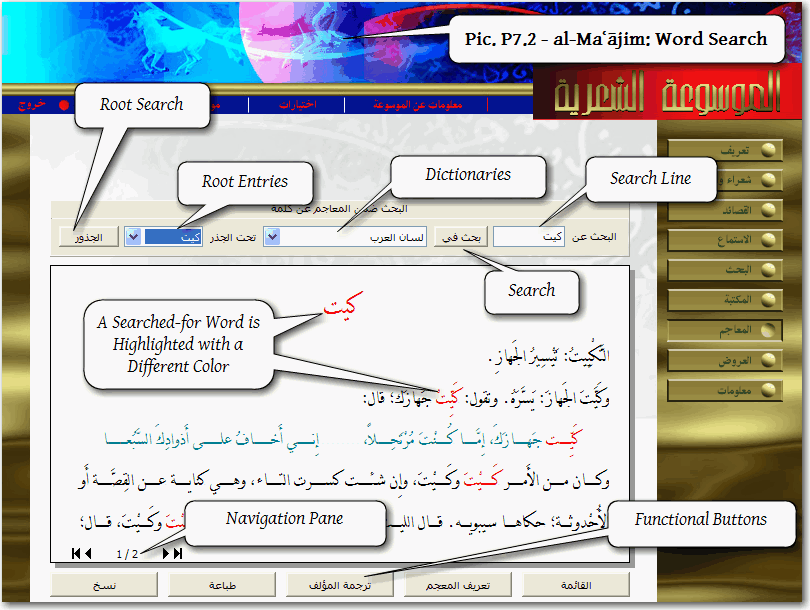
There are two ways of searching for a word: one is to search for a root (see Pic. P7.1), and the second one is to search for a particular word (see Pic. P7.2).
[Pic. P7.1]
In the Root Search window (Pic. P7.1) one can select a desired dictionary in the Dictionaries pane, and then to search for a desired root in two different ways. The first is to use Root Search to type in a searched-for root. The second is to browse a selected dictionary for a desired root by scrolling Available Roots; one can use the Alphabet Pane to limit number of roots by their first letter: the number of roots starting with kāf in Lisān al-ʿarab is 400. Root Statistics will automatically display the number of available roots: one can [un]check available options to get statistical overview of triliteral (thulāthī), quadriliteral (rubāʿī) and “multi-literal” (mazīd) roots.
On the bottom of the screen one can find familiar Functional Buttons available in other sections of the database. Click the Word Search button to get to the Word Search window.
[Pic. P7.2]
Here, in the Search Line, one can type in a searched-for word (in Dictionaries one needs to select a dictionary, which will be searched for a desired word). Click Search button to start searching: search results will be highlighted with a different color. Searched results can be viewed by root entries: select a desired root in Root Entries to view search results in a particular root entry.
Click Root Search button (al-Judhūr) to return to the Root Search window.
al-ʿArūḍ window
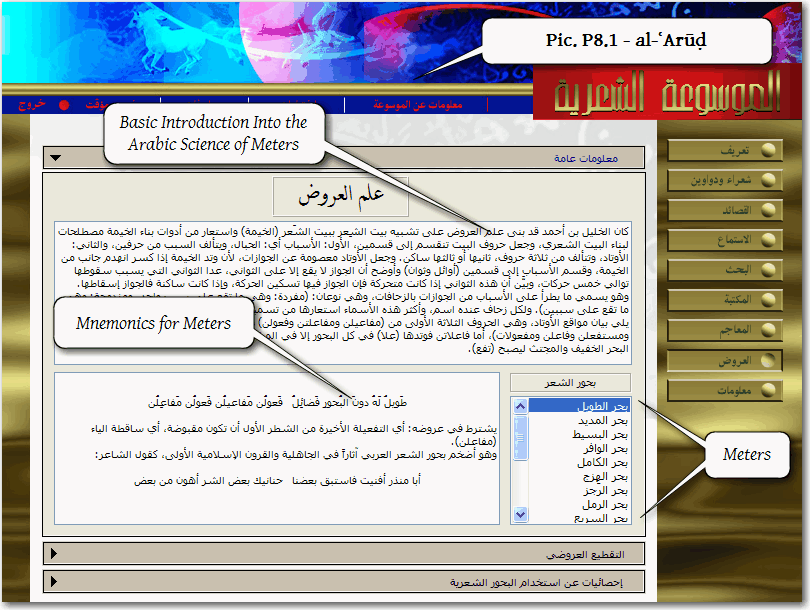
This section of the database contains three sub-sections. The first section — Maʿlūmat ʿāmma (Pic. P8.1) — contains a very basic introduction into the ʿilm al-ʿarūḍ and mnemonics for 16 different metres of Arabic poetry.
[Pic. P8.1]
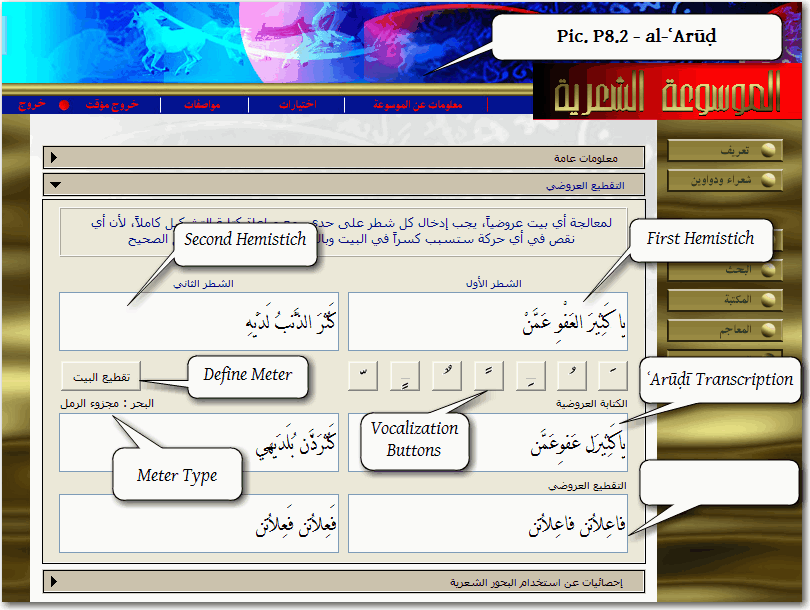
The second one — al-Taqṭīʿ al-ʿarūḍī (Pic. P8.2) — is a very useful tool for defining meter of certain lines of poetry. One must enter the first and second hemistiches separately in respective cells (al-Shaṭr al-awwal and al-Shaṭr al-thānī); both lines must be completely vocalized, otherwise the analyzer will not start (Vocalization Buttons can be used for entering short vowels). After clicking Define Meter button (Taqṭīʿ al-bayt), the analyzer will display the kind of the metre in Metre Type field (al-Baḥr) — majzūʾ al-raml, in our case. In the lower two cells — ʿArūḍī Transcription — both hemistiches will be transcribed according to the rules of al-ʿarūḍ; and in the lowest two cells (Metre Formula) the formula of the metre is displayed.
[Pic. P8.2]
The third section — Iḥṣāʾiyyāt ʿan al-istikhdām al-buḥūr al-shiʿriyya (Pic. P8.3) — is all about numbers. It provides an exhaustive Statistical Data on metre preferences of Arab poets throughout the history of Arabic poetry. In its entirety, the statistical table (see Totals on Pic. P8.3) embraces 23 different metres, 117,081 poems and 1,480,402 verses. Statistical Data in the table can be sorted by any of its fields: Metre (al-Baḥr), [Number of] Poets (al-Shuʿarāʾ), [Number of] Poems (al-Qaṣāʾid) and [Number of] Verses (al-Abyāt). Statistical Data can also be filtered by epochs (12 buttons in Chronological Ranges pane).
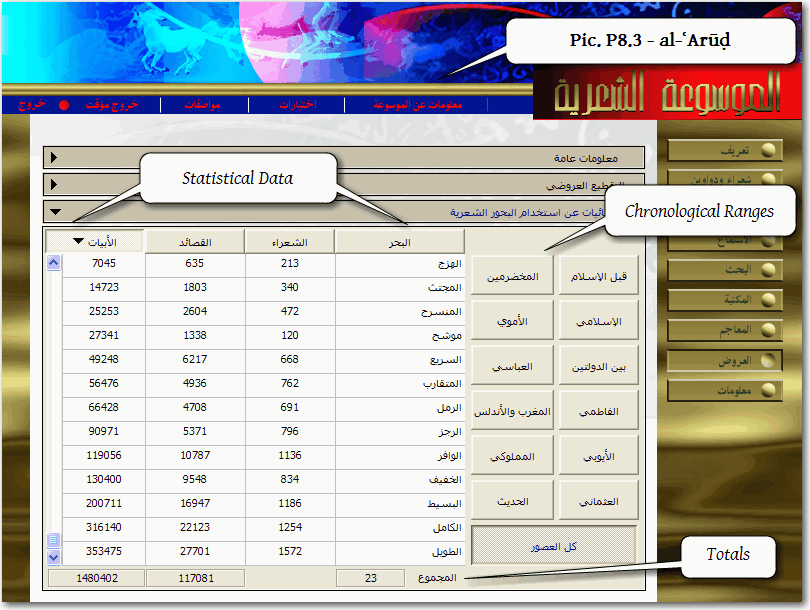
[Pic. P8.3]
Maʿlūmāt window
With its three sub-sections, Maʿlūmāt provides detailed statistical information on the materials included in different sections of the database. Visually, these sections are very similar to the third sub-section of al-ʿArūḍ section.
The first sub-section — al-Dawāwīn al-shiʿriyya — is a detailed table on poets and poems. The table consists of the following columns, any of which can be used to sort information: Name of a poet; Year of birth; Year of demise; Epoch, to which a poet belongs; Number of poems; Number of verses. The representation of data in the table can be narrowed down by choosing a certain epoch and region (at the bottom of the screen). For years of birth and demise one can select either A.H., or A.D.
The second subsection — al-Maktaba — is a detailed table on sources included into the Library section. This screen is basically the same as the main screen of al-Maktaba section with the exception of Author’s Bio and Annotation to a Book, which are lacking here. Similarly, the third section repeats the main screen of al-Maʿājim section.