9 Lesson 09: Extracting Tagged Data for Analysis
9.1 Concept of tidy data
- Each variable is in its own column
- Each observation is in its own row
- Each value is in its own cell
(NB: Additionally, data must be normalized, i.e. values in the same columns must be in the same format: if length, all in inches or centimeters; if weight, all in pounds or kilos; etc. It does not matter what units are used; the important part is that the same units are used throughout.)
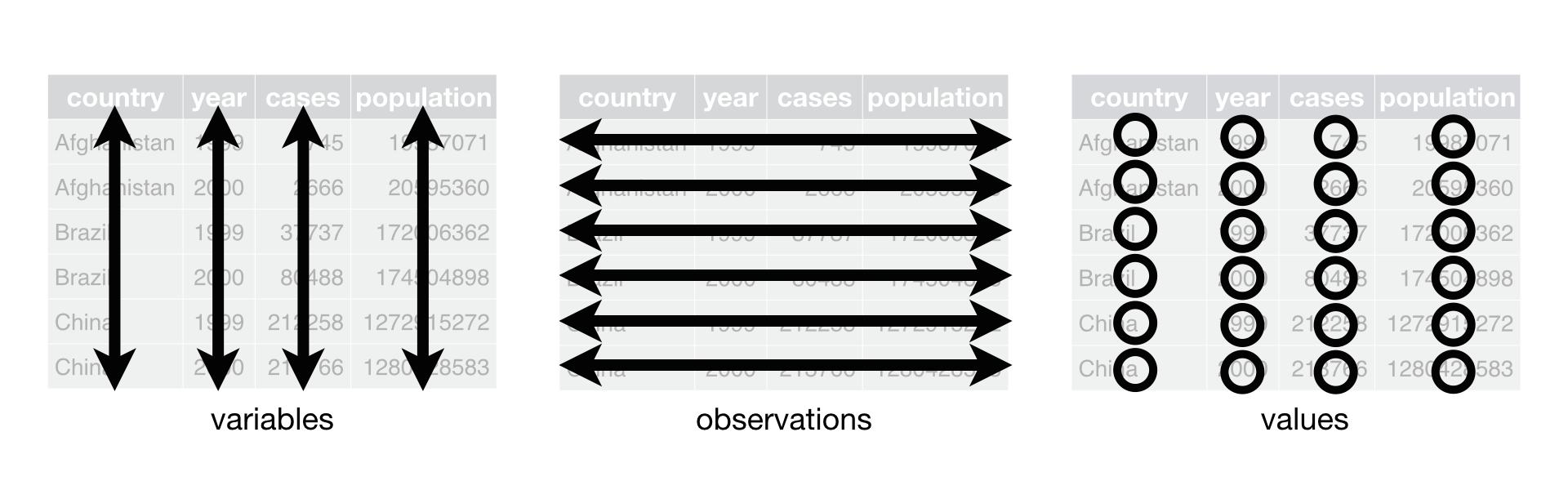
Source: Wickham, Hadley, and Garrett Grolemund. 2017. R for Data Science: Import, Tidy, Transform, Visualize, and Model Data. Sebastopol, CA: O’Reilly UK Ltd. https://r4ds.had.co.nz/; for a Chapter on tidy data, see: https://r4ds.had.co.nz/tidy-data.html.
9.2 Extracting tagged entities
Why? We can analyze tagged entities as they feature across time and space in the coverage of the Dispatch (again, for all intents and purposes, we can use this newspaper as an equivalent of a chronicle, or even broader, as that of a chronological corpus.)
How? Different types of entities are already tagged in the text and we can use this tagging to make abstractions of each article. These abstractions is what we will then use in our initial simple analysis. In order to extract tagged data, we first need to understand what we can extract. This can be done by creating a frequency list of all XML tags used in the issues of the Dispatch. These results will help us to understand what kind of data we can use for analysis. The following script counts all the tags and saves results into a TSV format organized from the most frequent to the least frequent.
import re
import os

source = "./Dispatch/"
target = "./Dispatch_Processed/"  # needs to be created beforehand!

lof = os.listdir(source)

resDic = {}

for f in lof:
    if f.startswith("dltext"):  # fileName test
        newF = f.split(":")[-1] + ".yml"  # in fact, yml-like

        # collect and count all XML tags

        issueVar = []
        c = 0  # technical counter
        with open(source + f, "r", encoding="utf8") as f1:
            text = f1.read()

            for i in re.findall(r"(<\w+)", text):
                # print(i)

                if i in resDic:
                    resDic[i] += 1
                else:
                    resDic[i] = 1

final = []
for k, v in resDic.items():
    value = "%010d\t%s" % (v, k)
    final.append(value)
    # input(value)

sortedResults = sorted(final, reverse=True)
finalResults = "\n".join(sortedResults)
with open("tag_results.csv", "w", encoding="utf8") as f9:
    f9.write(finalResults)

print("Done!")
The results will look in the following manner (with some ommissions to save space):
0000907398  <milestone
0000649103  <p
0000552453  <persName
0000526235  <surname
0000446296  <head
0000402419  <placeName
0000370390  <num
0000353521  <rs
0000342807  <div3
0000325316  <foreName
0000197514  <roleName
0000170166  <measure
0000164988  <orgName
0000106719  <hi
...
0000017332  <div1
0000015210  <cit
0000013816  <opener
...
0000002571  <table
0000002445  <sic
0000002278  <language
...
0000001349  <text
0000001349  <teiHeader
0000001349  <taxonomy
...
0000000016  <dateRange
0000000013  <div6
0000000001  <div7
These results suggest that the following tags can be useful, as they have high frequencies and carry meaningful data:
<persName>(552,453);<placeName>(402,419);<orgName>(164,988);
(<rs> is another frequent tag with potentially valuable information (353,521). These tagged entities, however, lack additional metadata, which will make their analysis more complicated, so we will skip it. On the <rs> tag see </https://tei-c.org/release/doc/tei-p5-doc/en/html/ref-rs.html/>.)
Next step will be to understand the structure of these selected tags and process them accordingly, aggregating results into a tidy format. We can build on the script from the previous lesson, to which we will need to add some modifications. This is your homework :)
Our tidy results should look similar to what you see below:
| articleID | date | itemType | itemUnified | itemId |
|---|---|---|---|---|
| 1864-04-28_article_002 | 1864-04-28 | placename | plymouth, washington, north carolina | tgn,2076159 |
| 1864-04-28_article_002 | 1864-04-28 | placename | plymouth, washington, north carolina | tgn,2076159 |
| 1864-04-28_article_002 | 1864-04-28 | persname | wessels,brigadier-general,,,, | wessels,h.,w. |
| 1864-04-28_article_002 | 1864-04-28 | persname | lincoln,,,,, | lincoln |
| 1864-04-28_article_002 | 1864-04-28 | placename | plymouth, washington, north carolina | tgn,2076159 |
| 1864-04-28_article_002 | 1864-04-28 | persname | moffitt,colonel,,,, | moffitt |
| 1864-04-28_article_002 | 1864-04-28 | placename | plymouth, washington, north carolina | tgn,2076159 |
| 1864-04-28_article_002 | 1864-04-28 | orgname | free school | school |
| 1864-04-28_article_002 | 1864-04-28 | orgname | episcopal church | church |
| 1864-04-28_article_002 | 1864-04-28 | persname | moffitt,lieutenant-colonel,,,, | moffitt |
| 1864-04-28_article_002 | 1864-04-28 | persname | wessels,brigadier-general,h.,w.,, | wessels,h.,w. |
| 1864-04-28_article_002 | 1864-04-28 | persname | stewart,,andrew,,, | stewart,andrew |
| 1864-04-28_article_002 | 1864-04-28 | placename | plymouth, washington, north carolina | tgn,2076159 |
| 1864-04-28_article_002 | 1864-04-28 | orgname | provost guard | guard |
| 1864-04-28_article_002 | 1864-04-28 | persname | wessels,brigadier-general,h.,w.,, | wessels,h.,w. |
| 1864-04-28_article_002 | 1864-04-28 | persname | beegle,,d.,f.,, | beegle,d.,f. |
| 1864-04-28_article_002 | 1864-04-28 | placename | plymouth, washington, north carolina | tgn,2076159 |
The structure of this data is as follows:
articleIDis the ID of each article;dateis the date when the article was published (the same date effectively refers to the same issue);itemType,itemUnified,itemId: these following three columns represent each tagged entity. In most cases each entity can be described with a single or multiple variables. A single variable can be used when it represents some kind of unique identifier from some external database/databank. such unique identifiers can be used to collect additional information on our entities from these external databases/databanks. For example, for<placeName>entities it could be enough to use thekey=attribute which contains unique identifiers (for example,tgn,2111971) from the Getty Thesaurus of Geographical Names (http://tgndownloads.getty.edu/default.aspx). Unfortunately, such data is not available more often than it is. I decided to use the following three elements (ideally trying to preserve (1) the type of an entity (itemType), (2) how it appears in the text (skipped), (3) its unified/normalized form (itemUnified, not available for all types); and (4) its unique identifier (itemId, also not available for all types)).
9.3 Homework
- Finish the assigned task;
- Annotate your script (i.e., add comment to every line of code describing what is happenning there);
Submitting homework:
- Homework assignment must be submitted by the beginning of the next class;
- Now, that you know how to use GitHub, you will be submitting your homework pushing it to github:
- Create a relevant subfolder in your repository and place your HW files there; push them to your GitHub account;
- Email me the link to your repository with a short message (Something like: I have completed homework for Lesson 3, which is uploaded to my repository … in subfolder
L03)
- Email me the link to your repository with a short message (Something like: I have completed homework for Lesson 3, which is uploaded to my repository … in subfolder
- Create a relevant subfolder in your repository and place your HW files there; push them to your GitHub account;
9.4 Solution
Below is the solution to the homework: all issues of the Dispatch (stored in ./Dispatch/) are converted into YML and saved into a different folder (./Dispatch_Processed/). This is essentially the script from the previous lesson, to which additional lines of code have been added (after # NEW PART).
import re
import os

source = "./Dispatch/"
target = "./Dispatch_Processed/"  # needs to be created beforehand!

lof = os.listdir(source)
counter = 0  # general counter to keep track of the progress

entities = []  # we will collect all extracted data here

for f in lof:
    if f.startswith("dltext"):  # fileName test
        newF = f.split(":")[-1] + ".yml"  # in fact, yml-like

        issueVar = []
        c = 0  # technical counter
        with open(source + f, "r", encoding="utf8") as f1:
            text = f1.read()
            date = re.search(r'<date value="([\d-]+)"', text).group(1)
            split = re.split("<div3 ", text)

            for s in split[1:]:
                c += 1
                s = "<div3 " + s  # a step to restore the integrity of items

                try:
                    unitType = re.search(r'type="([^\"]+)"', s).group(1)
                except:
                    unitType = "noType"

                try:
                    header = re.search(r'<head.*</head>', s).group(0)
                    header = re.sub("<[^<]+>", "", header)

                except:
                    header = "NO HEADER"

                text = s
                text = re.sub("<[^<]+>", " ", text)
                text = re.sub(" +\n|\n +", "\n", text)
                text = text.strip()
                text = re.sub("\n+", ";;; ", text)
                text = re.sub(" +", " ", text)
                text = re.sub(r" ([\.,:;!])", r"\1", text)

                itemID = date + "_" + unitType + "_%03d" % c

                if len(re.sub("\W+", "", text)) != 0:
                    itemIdvar = "ID: " + itemID
                    dateVar = "DATE: " + date
                    unitType = "TYPE: " + unitType
                    header = "HEADER: " + header
                    # @§@ is used to replace ":", because in YML : is used as a divider between the key and value
                    text = "TEXT: " + text.replace(":", "@§@") + "\n\n"
                    var = "\n".join(
                        [itemIdvar, dateVar, unitType, header, text])

                    issueVar.append(var)

                    # NOW, WE CAN ADD SOME CODE TO PROCESS EACH ITEM AND COLLECT ALL INTO OUR TIDY DATA FORMAT
                    # STRUCTURE: itemID, dateVar, EXTRACTED_ITEM (type, unified_form, id)
                    # ADDING TO: entities (list)

                    for i in re.findall(r"(<\w+[^>]+>)", s):
                        if "persName" in i and "authname" in i and "n=" in i:
                            # input(i)
                            itemType = "persName"
                            itemUnified = re.search(r'n="([^"]+)"', i).group(1)
                            itemId = re.search(
                                r'authname="([^"]+)"', i).group(1)

                            tempVar = "\t".join(
                                [itemID, date, itemType, itemUnified, itemId])
                            entities.append(tempVar)

                        elif "placeName" in i and "authname" in i and "reg=" in i:
                            # input(i)
                            itemType = "placeName"
                            itemUnified = re.search(
                                r'reg="([^"]*)"', i).group(1)
                            itemId = re.search(
                                r'authname="([^"]+)"', i).group(1)

                            tempVar = "\t".join(
                                [itemID, date, itemType, itemUnified, itemId])
                            entities.append(tempVar)

                        elif "orgName" in i and "type" in i and "n=" in i:
                            # print(i)
                            itemType = "orgName"
                            itemUnified = re.search(r'n="([^"]+)"', i).group(1)
                            itemId = re.search(
                                r'type="([^"]+)"', i).group(1)

                            tempVar = "\t".join(
                                [itemID, date, itemType, itemUnified, itemId])
                            entities.append(tempVar)

                        else:
                            pass

        issueNew = "".join(issueVar)
        with open(target + newF, "w", encoding="utf8") as f9:
            f9.write(issueNew)

        # count processed issues and print progress counter at every 100
        counter += 1  # counter = counter + 1
        # if counter is divisible by 100 (i.e., no remainder), then print it
        if counter % 100 == 0:
            print(counter)

header = "\t".join(["articleID", "date", "itemType", "itemUnified", "itemID"])
entitiesFinal = header + "\n" + "\n".join(entities).lower()
with open("entities.csv", "w", encoding="utf8") as f9:
    f9.write(entitiesFinal)

print("Done!")